
Image to Video AI : Turn Any Image into Motion
Generate cinematic videos from any photo with AI. Designed for beginners and professionals who want fast, flexible, and watermark-free video creation.
Generate cinematic videos from any photo with AI. Designed for beginners and professionals who want fast, flexible, and watermark-free video creation.
Image
One image per video
Upload Image
We accept .jpeg, .jpg, .png, .webp formats up to 24MB.
Prompt
Resolution
Duration
5s5s16s
See How Image to Video AI Brings Ideas to Life
AI Anime Videos
AI Product Ads
AI Short Drama
AI Social Media Videos
AI Real Estate Videos
How to Create Videos with Images in 3 Easy Steps
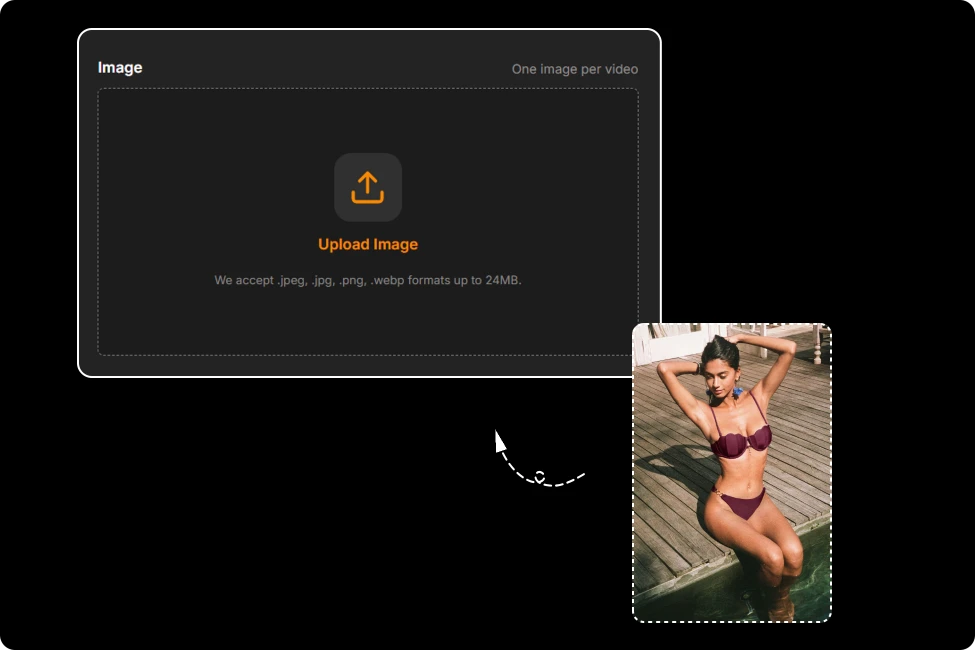
Step 1: Upload Your Image
Upload a JPG, JPEG, PNG, or WEBP image. Your original photo quality is preserved for the best video generation results.
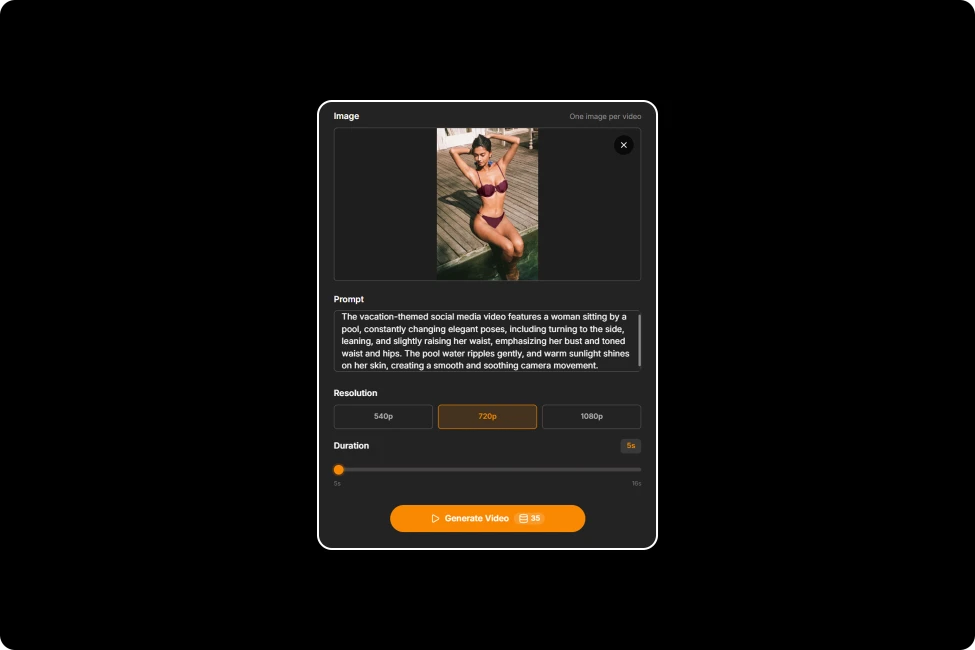
Step 2: Customize Your AI Video
Describe your vision with a prompt, choose your preferred aspect ratio, and let AI transform your image into an engaging video.
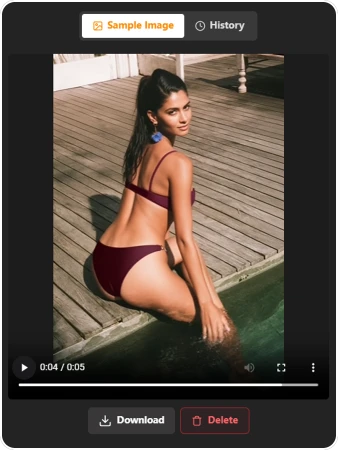
Step 3: Download Your Video
Preview the generated animation and download a high-quality MP4 video with no watermark, ready for sharing anywhere.
Create Videos That Start with a Single Image
Perfectly Framed for Every Screen
Different platforms, different formats—one effortless workflow. Our Image to Video AI Generator lets you choose the ideal output ratio before generation, so every video is perfectly optimized for TikTok, Instagram Reels, YouTube Shorts, Facebook, X, LinkedIn, and more. Skip the extra editing and start sharing instantly.
Ideas Move Fast. So Does Image to Video AI.
Waiting kills momentum. Our Photo to Video AI is optimized for rapid generation, turning your ideas into ready-to-share videos in minutes instead of hours. Explore more creative directions, iterate faster, and keep every spark of inspiration alive before it fades.
Crystal-Clear Image to Video AI, Down to Every Detail
Tiny details make the biggest difference. Our Image to Video AI preserves sharp textures, natural lighting, and lifelike colors while enhancing motion smoothness frame by frame. Export every creation as a clean, watermark-free HD MP4, ready for professional presentations or social sharing.
Image to Video AI Tips & Best Practices
Customer Experiences with Photo to Video AI
"
I uploaded five product photos and added simple prompts. The generated videos looked professional enough for my Facebook ads and noticeably increased engagement.
Emily Carte
E-commerce Store Owner
"
I transformed menu photos into eye-catching videos for TikTok. Customers even mentioned they visited after seeing the animated posts.
Lucas Bennett
Coffee Shop Owner
"
I used thiss Free AI Image to Video Generator to turn one travel photo into an Instagram Reel. It saved me hours of editing while creating smooth, natural-looking motion that was ready to post.
Content Creator
Freelance Illustrator
FAQ about AI Image to Video Generator
What Is Image to Video AI and How Does It Work?
Image to Video AI transforms a single photo into a moving video using advanced AI models. Simply upload your image, enter a motion prompt, choose your settings, and the AI generates a smooth, natural-looking animation in minutes.
Can I Control the Motion in Image to Video AI?
Yes. You can describe camera movement, facial expressions, object motion, or scene actions with prompts. The more detailed your instructions, the more accurately the AI follows your creative vision.
What Types of Images Are Supported?
Our free Image to Video AI supports JPG, JPEG, PNG, and WEBP images up to 24MB. High-resolution, well-lit images with clear subjects typically produce smoother motion and more realistic video results.
How Can I Get Better Images to Video Results?
Start with a sharp, high-quality image and write a clear motion prompt. Describe specific movements, camera angles, lighting, or emotions to help the AI generate more natural and visually engaging videos.
How Do I Write a Good Motion Prompt?
Focus on describing movement instead of appearance. For example, write prompts like "the camera slowly zooms in while the woman smiles and her hair moves naturally in the wind" for more cinematic results.
Is My Uploaded Image Kept Private?
Absolutely. Your uploaded images and generated videos are processed securely and handled with strict privacy protection. Your content isn't shared publicly or used without your permission.
Will My Image to Video AI Output Include a Watermark?
No. Every generated video is exported as a clean, high-definition MP4 without watermarks, making it ready for social media, presentations, marketing campaigns, or personal projects immediately.
Your Next Video Starts Here
Static images can tell stories—but animated videos capture attention. Turn your favorite photos into engaging videos with AI and discover a faster way to create content for every platform.
Generate cinematic videos from any photo with AI. Designed for beginners and professionals who want fast, flexible, and watermark-free video creation.
Image
One image per video
Upload Image
We accept .jpeg, .jpg, .png, .webp formats up to 24MB.
Prompt
Resolution
Duration
5s5s16s
See How Image to Video AI Brings Ideas to Life
AI Portrait Videos
AI Anime Videos
AI Product Ads
AI Short Drama
AI Social Media Videos
AI Real Estate Videos
How to Create Videos with Images in 3 Easy Steps
Step 1: Upload Your Image
Upload a JPG, JPEG, PNG, or WEBP image. Your original photo quality is preserved for the best video generation results.
Step 2: Customize Your AI Video
Describe your vision with a prompt, choose your preferred aspect ratio, and let AI transform your image into an engaging video.
Step 3: Download Your Video
Preview the generated animation and download a high-quality MP4 video with no watermark, ready for sharing anywhere.
Create Videos That Start with a Single Image
Perfectly Framed for Every Screen
Different platforms, different formats—one effortless workflow. Our Image to Video AI Generator lets you choose the ideal output ratio before generation, so every video is perfectly optimized for TikTok, Instagram Reels, YouTube Shorts, Facebook, X, LinkedIn, and more. Skip the extra editing and start sharing instantly.
Ideas Move Fast. So Does Image to Video AI.
Waiting kills momentum. Our Photo to Video AI is optimized for rapid generation, turning your ideas into ready-to-share videos in minutes instead of hours. Explore more creative directions, iterate faster, and keep every spark of inspiration alive before it fades.
Crystal-Clear Image to Video AI, Down to Every Detail
Tiny details make the biggest difference. Our Image to Video AI preserves sharp textures, natural lighting, and lifelike colors while enhancing motion smoothness frame by frame. Export every creation as a clean, watermark-free HD MP4, ready for professional presentations or social sharing.
Image to Video AI Tips & Best Practices
Customer Experiences with Photo to Video AI
"
I uploaded five product photos and added simple prompts. The generated videos looked professional enough for my Facebook ads and noticeably increased engagement.
Emily Carte
E-commerce Store Owner
"
I transformed menu photos into eye-catching videos for TikTok. Customers even mentioned they visited after seeing the animated posts.
Lucas Bennett
Coffee Shop Owner
"
I used thiss Free AI Image to Video Generator to turn one travel photo into an Instagram Reel. It saved me hours of editing while creating smooth, natural-looking motion that was ready to post.
Content Creator
Freelance Illustrator
FAQ about AI Image to Video Generator
What Is Image to Video AI and How Does It Work?
Image to Video AI transforms a single photo into a moving video using advanced AI models. Simply upload your image, enter a motion prompt, choose your settings, and the AI generates a smooth, natural-looking animation in minutes.
Can I Control the Motion in Image to Video AI?
Yes. You can describe camera movement, facial expressions, object motion, or scene actions with prompts. The more detailed your instructions, the more accurately the AI follows your creative vision.
What Types of Images Are Supported?
Our free Image to Video AI supports JPG, JPEG, PNG, and WEBP images up to 24MB. High-resolution, well-lit images with clear subjects typically produce smoother motion and more realistic video results.
How Can I Get Better Images to Video Results?
Start with a sharp, high-quality image and write a clear motion prompt. Describe specific movements, camera angles, lighting, or emotions to help the AI generate more natural and visually engaging videos.
How Do I Write a Good Motion Prompt?
Focus on describing movement instead of appearance. For example, write prompts like "the camera slowly zooms in while the woman smiles and her hair moves naturally in the wind" for more cinematic results.
Is My Uploaded Image Kept Private?
Absolutely. Your uploaded images and generated videos are processed securely and handled with strict privacy protection. Your content isn't shared publicly or used without your permission.
Will My Image to Video AI Output Include a Watermark?
No. Every generated video is exported as a clean, high-definition MP4 without watermarks, making it ready for social media, presentations, marketing campaigns, or personal projects immediately.
Your Next Video Starts Here
Static images can tell stories—but animated videos capture attention. Turn your favorite photos into engaging videos with AI and discover a faster way to create content for every platform.